

Proposals and cards
A proposal is a change Piste puts on a card with buttons. See every kind, its exact buttons, who can press them, when it goes out of date and how to undo it.
A proposal is a change Piste wants to make, stored with its evidence and shown as a card with buttons. Nothing changes until someone presses the card's button, and then exactly that change is written, once. An automation run leaves every change it wants to your store or ad accounts as a proposal, and conversations can raise them too.
Where do cards appear?
| Raised by | Where the card goes |
|---|---|
| An automation run that posts to Slack | Under the run's post, one card per change |
| A conversation in Slack | A message of cards in the same thread, after Piste's reply |
| An automation run that posts to the web or iMessage | Needs you in the web app |
| A conversation on the web or over iMessage | Needs you in the web app |
Open ad changes, store edits and change follow-ups are also in Needs you wherever they were raised, so you can decide them without Slack.
A Slack message holds at most 10 cards. When a run has more, its post says "N more changes are waiting for a decision: a message holds only 10, so the next post carries them." A conversation's cards go as several messages of 10. A run that found nothing to report but has changes waiting still posts, with the line "has nothing new to report, and changes waiting for a decision."
Over iMessage, which has no buttons, a run's text ends with how many changes are waiting and a link to Needs you.
Who can press a card's buttons?
| Card | Who can decide |
|---|---|
| Under an automation run's post in Slack | Any full, active member of the Slack workspace Piste is installed in |
| Raised in a conversation | The workspace owner only |
Take pre-orders past zero | The workspace owner only, wherever the card is |
| A Gmail draft | The workspace owner only, wherever the card is, since it's their mailbox |
A standing approval offer, and its Switch it off and Stop doing these without asking Early access | The workspace owner only |
Release it on a held order | The person who held the order, or the owner |
| An ad change an agency proposed in an agency room Early access | Any full, active member of your own Slack workspace, never the agency's people |
Show the working | Anyone in the Slack workspace who can see the card, guests included |
| Any card in Needs you on the web | The workspace owner, the only person who signs in on the web |
Piste checks with Slack on every press that the person is a full, active member of the workspace Piste is installed in. The first time someone presses a card under a run's post, they join your Piste workspace as a light member. If a press is refused, nothing changes and Piste tells that person privately:
| Message | Why |
|---|---|
| "Only full members of this Slack workspace can decide on changes here." | They're a guest or a deactivated account, or Slack didn't confirm they're a full member. |
| "Only people in the Slack workspace this was posted in can decide on it." | They're from another organisation in a shared channel. |
| "Only the workspace owner can decide on this change: it was raised in a conversation, not by an automation in this channel." | The card came from a conversation. |
| "Only the workspace owner can switch on taking orders past zero, since customers would buy what isn't in stock. Piste has asked them in this thread. Nothing was changed." | A teammate pressed a pre-order card. |
"Only <owner> can do this: it's their own Gmail. Piste has asked them in this thread." | A teammate pressed a Gmail draft card. |
"<name> held this order, so only they or the workspace owner can release it here. Nothing was changed; anyone with access can release it in Shopify." | Someone else pressed Release it. |
| "Piste couldn't check this button just now, so nothing was changed. Try again in a minute." | Piste couldn't reach Slack to check the press. |
What kinds of proposal are there?
Almost every card goes out of date 7 days after it's raised, and once applied offers Undo. The exceptions are in the last two paragraphs of this section.
In your Shopify store
| Kind | Raised by | Buttons |
|---|---|---|
| Discount fix | The first read of your store, the Change follow-ups run (at most one a run), or Piste in a conversation or automation run | Limit it to one use per customer, End it <date> or Remove the end date, and Leave it |
| Price change | A conversation, never an automation run | Lower the price, Raise the price or Set the compare-at price, and Leave it |
| Clearance markdown | The Change follow-ups run, weekly, or a conversation | Mark it down, Leave it |
| Price probe | The Change follow-ups run, weekly, or a conversation | Start the probe, Leave it |
| Keeping a probe's price | A price probe that passed | Put it up to <price> for good, Leave it at <price> |
| Pre-order | Stock watch, or asking Piste what's about to sell out | Take pre-orders past zero, Leave it |
| Switching a pre-order off | Stock watch, or asking Piste what's about to sell out | Switch pre-order off, Leave it |
| Order hold | A store trigger's run on an order, or a conversation | Hold its fulfilment, It's fine |
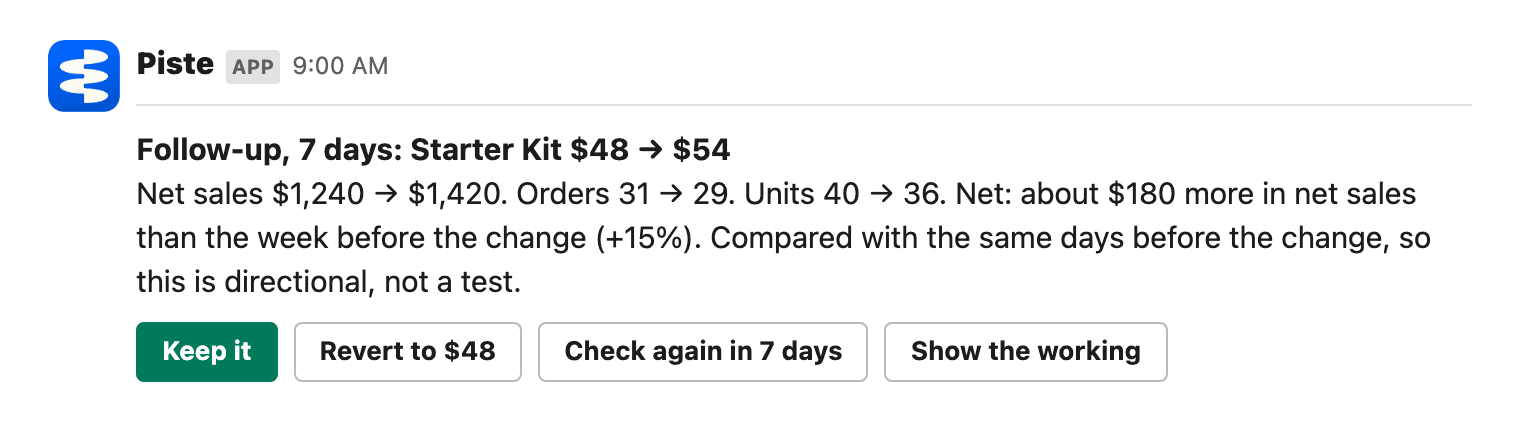
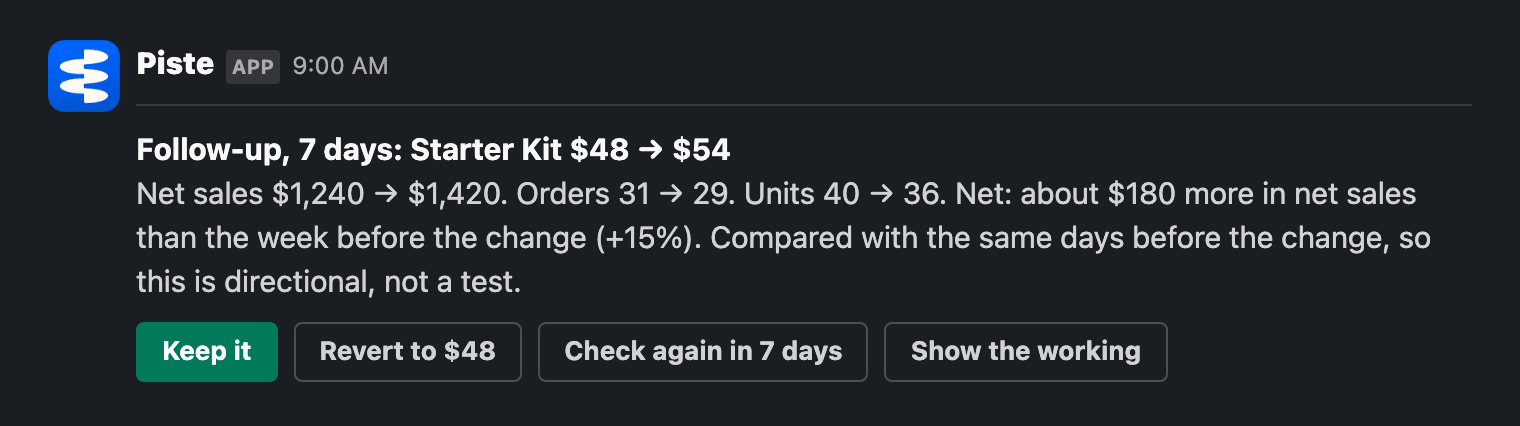
| Change follow-up | The Change follow-ups run | Keep it, a revert button, and Check again in 7 days once there's a verdict |
The revert button on a change follow-up reads Revert to <old price>, Turn the discount off, or Revert for a change Piste made itself. There's none for a product launch, or once the price has changed again since. See Store edits and Change follow-ups for the detail of each.
In ad accounts and apps
| Kind | Raised by | Buttons |
|---|---|---|
| Ad change Early access | Ad spend watch, the owner's conversation, or an agency room | Lower it, Raise it, Pause it, Turn it on, Turn it off, Switch it, Add negatives or Apply, and Leave it |
| Budget change Early access | The weekly plan or the Monday budget memo, or a plan you asked for in a Slack conversation | Approve and apply, Not this week |
| Standing approval offer Early access | Ad spend watch, once earned | Yes, do these without asking, Keep asking me |
| Gmail draft | The owner's automation run, or the owner's own Slack conversation, with Gmail connected | Create the draft, Leave it |
Out of date after 7 days, except: an order hold, after 24 hours; a change follow-up, which stays open until it's decided; a budget change, which never goes out of date, though nothing is written if the campaign's budget has moved since the plan read it (see Weekly plan); and a standing approval offer, which isn't offered again for 90 days after Keep asking me.
Undo once applied, except: a price probe offers End it now; an order hold, Release it; a Gmail draft, Delete the draft; a standing approval, Switch it off and then Switch it back on; and a change follow-up or a budget change has nothing after it's decided.
A Gmail draft is a supplier reorder email, written from a fixed template with your store's facts, created in your Gmail drafts and never sent. It's addressed only to the supplier address you gave Piste in a conversation and approved; without one, the card asks for it and has no button, and a card raised before you changed the address creates nothing. The web chat and iMessage can't raise one. Gmail drafts haven't yet been tested against a real mailbox. See Connected apps.
What happens when you press a button?
Piste's own code handles the press, not the AI model. It applies the change at most once, however many times the button is pressed, and redraws the card from its record so it shows who decided and when, for example "Applied by Maya Chen · 6 Oct" on an ad change. Every press is recorded in the decision log.
- The change is checked first. Before writing, Piste reads the product, discount, order or campaign again. If it has changed since the proposal, nothing is written and the card says what it is now.
- No is remembered.
Leave iton a store edit or ad change replies "Left as it is. Nothing was changed, and it won't be proposed again."It's fineon an order hold means Piste won't propose holding that order again. - A second press says so. Someone who presses after a decision, in Slack or on the web, is told it was already decided and what its state is.
- Missing Shopify permission stops the write. Piste says which permission it needs and where to grant it, the card stays open, and pressing again after granting it applies the change.
- An unclear result is never sent twice. If Shopify or the ad platform doesn't answer, Piste reads the result back once. If it still can't tell, the card says the outcome is unknown, asks you to check, and the change is never sent again.
Results that come later, such as what a change did a week on, are posted as replies in the card's thread. A budget change, ad change or change follow-up card under a run's post that's still open after a day may get one reminder in its thread, never more; Quiet hours and digests says when. Store edit cards don't get reminders.
When does a proposal go out of date?
Store edits, ad changes and Gmail drafts go out of date 7 days after they were proposed. An order hold goes out of date after 24 hours, because a hold only helps before the order is packed. An out-of-date proposal can't be applied: pressing its button changes nothing, and the card says it's out of date.
- An out-of-date store edit says when it was proposed, that it's more than 7 days old so nothing was changed, and that Piste proposes it again if it still holds.
- An out-of-date order hold says to look at the order in Shopify, where it can be held by hand.
- An out-of-date ad change shows a single
Clear itbutton. The next Ad spend watch post checks it again. - An undo never goes out of date, and nor does turning something back on that Piste paused because products sold out.
- A change follow-up stays open until someone keeps or reverts it, and a budget change until someone decides it.
How do I undo a change?
| Button | On | What it does |
|---|---|---|
Undo | An applied store edit or ad change | Writes back exactly what the change replaced, after checking nothing has moved since |
Revert (or Revert to <price>, Turn the discount off) | A change follow-up | Sets the price back or turns the discount off, if the store still has what was recorded |
Release it | A held order | Lifts exactly Piste's holds on the order |
End it now | A running price probe | Ends the probe early and puts the price back |
Delete the draft | A created Gmail draft | Deletes only the draft that card created |
Each change has one undo, and an undo has no undo of its own. A change that turned out to change nothing offers no Undo. If an undo fails, the button stays so you can try again. On a change Piste made from a store edit, Undo on the edit's card and Revert on its follow-up are the same undo: whichever is pressed first settles both. A budget change has no Undo.
What is "Show the working"?
Show the working is the last button on ad change, budget change and change follow-up cards in Slack. It posts the evidence behind the card as one reply in its thread, laid out by Piste's code from the proposal's record, within about a minute. It changes nothing.
The reply is headed "The working" with the card's title, and has these sections where they apply: "What I looked at", "What I found", "The rule I applied", "What will change", "How it comes back", "What would make this wrong", "The query", and, once decided, "What was written". For an ad change, it's what the check saw when it proposed the change, since the same read a day later would give other numbers.
It posts once while the card is open, and once more after the decision. Asking Piste "why this one?" in the card's thread answers from the same record. Store edit, Gmail draft and standing approval cards don't have the button, and Needs you doesn't show it.
What does Needs you list?
Needs you in the web app lists open proposals so you can decide without Slack, with the same buttons and the same rules as the Slack cards. A decision there updates the Slack card too.
| In Needs you | Not in Needs you |
|---|---|
| Open ad changes Early access | Budget changes: Needs you shows how many are waiting, such as "1 budget change to review", and links to the Measurement page |
| Change follow-ups once their verdict is in | Gmail drafts |
| Open store edits, including markdowns, probes, pre-orders and order holds | Standing approval offers |
| "Decided lately": ad changes and change follow-ups decided in the last 7 days | "Show the working" |
Each card in Needs you says which automation raised it, or "In a conversation", and links to its Slack card with "Also in Slack" when it has one.
Limits
| Limit | Value |
|---|---|
| Cards in one Slack message | 10 |
| Store edits waiting per store | 10, not counting order holds |
| Ad changes waiting per ad account | 10 |
| Ad changes waiting from one agency room | 5 |
| Gmail drafts waiting | 10 |
| Price move in one store edit | 50% either way |
| A discount's end date | At most 365 days ahead |
| Budget move in one ad change | 20% |
| Negative keywords in one ad change | 50 |
| Fixes one Ad spend watch run proposes | 3 |
| Clearance markdowns one run proposes | 3 |
| Pre-orders one stockout check proposes | 3 |
| Out of date: store edits, ad changes, Gmail drafts | 7 days |
| Out of date: order holds | 24 hours |
| Open proposals Needs you lists | 30 |
| "Decided lately" in Needs you | Last 7 days, up to 10 |
Related
- Approvals: approvals in a conversation, and who can decide what.
- Store edits: every change Piste can make in Shopify.
- Ad changes: changes to Google Ads and Meta.
- Decision log: every decision and who took it.